Wayanadan Bus Mod Livery
- 155.00
- 4,6
- Asennukset
- 100.00K
- Hinta
- Free
Kuvakaappaukset
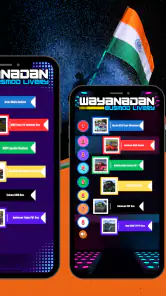
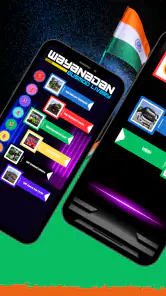
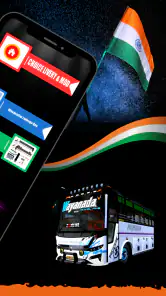
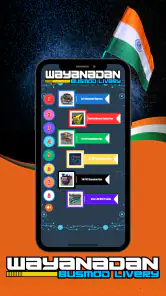
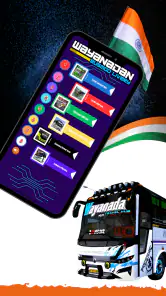
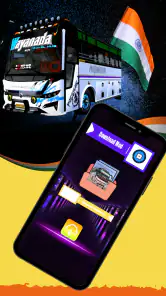
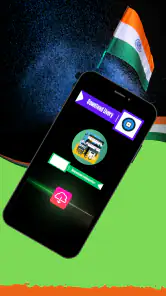
Analysoinut Reviewed
Wayanadan Bus Mod Livery on Android is a narrowly focused app for people who enjoy customizing a bus-simulation experience with Wayanad-themed bus designs. I would approach it as a companion for a particular kind of simulation, not as a full game or a general collection of vehicle tools. Its appeal depends on whether that specific look and the related bus-mod context are what you want; if you are mainly after a complete simulator, this is not a substitute for one.
My first impression is that the app’s value is tied to a simple task: finding and using a livery associated with Wayanadan buses. That makes it easier to understand than a broad customization suite, but also gives it a smaller audience. The livery is the point, so the experience makes most sense when you already know which bus-simulation setup you want to use it with.
When connectivity becomes part of the experience
A focused tool, not a complete simulator
The app is listed as a free Android app from Cryfish, and its subject is a Wayanad bus mod for a bus simulator. The name can sound like a standalone game at first, but I would not install it expecting routes, driving controls, passenger management or a full simulation campaign. Its role is centered on the livery and mod context rather than replacing the simulator where you drive.
That distinction matters when you are deciding what to do with it. If you already spend time with a bus simulator and want a region-specific visual identity for your vehicle, this is more relevant than a generic bus game. If you are new to the genre and simply want to start driving immediately, a complete simulator is the more sensible first download.
Connectivity shapes the practical experience because a mod-related app often sits between discovery and use: you may need to check what is available, understand how it is meant to fit your setup, and then switch to the simulator itself. I would plan to use it when I have a stable connection and enough time to follow that process, rather than assuming every step will be ready at a moment when the network is weak.
Why timing matters on a phone
A realistic use case is browsing for a bus look while waiting at home before a gaming session. With a reliable connection, you can take the time to inspect the livery context and then move to the simulator with a clearer idea of what you want to use. That is a more comfortable workflow than trying to sort out a mod while commuting or just before a short break ends.
On mobile, the temptation is to treat every app as something that should work equally well in any situation. I would be more cautious here. A livery’s usefulness depends not only on seeing it, but also on how it connects to the simulator you play. If you are away from a strong connection, it is wise to avoid starting a setup task that might require extra checking or switching between apps.
The app has a PEGI 3 age rating, which makes its listed content rating suitable for a broad audience. That does not change the practical point: younger players may still need help understanding how a mod-focused app relates to a separate simulator. I would explain that distinction before handing over the phone, so expectations are clear.
Recovering when a step does not go smoothly
With a focused mod app, the most frustrating moment is often not opening it; it is reaching a point where you are unsure whether the livery is ready for the simulator or whether you have missed a step. My advice is to keep the process deliberate: check the app’s instructions and presentation carefully, make one change at a time, and then test the result in the simulator before trying another variation.
This approach is more useful than repeatedly tapping around when something does not appear as expected. It helps separate a connection issue from a compatibility or setup issue. If the app’s content is slow to load, wait for the connection to settle before restarting the whole process. If the content appears but does not behave as you expected in the simulator, review the intended use rather than assuming that reinstalling will solve it.
I also recommend keeping the simulator and the mod app conceptually separate in your mind. The livery app may help with the visual side, while the actual driving experience belongs elsewhere. That small distinction makes troubleshooting less confusing: you can check the app for the design-related step and the simulator for what happens once you are ready to drive.
Using it without wasting mobile data
If you have a limited data plan, I would treat this as something to explore on Wi-Fi first. That is a practical precaution for any app centered on visual content or mod discovery, not a claim about a particular download size. You can decide whether the livery is worth using before making it part of your regular mobile routine.
A useful habit is to avoid repeatedly reopening the app just to check the same thing while travelling. Instead, look through it when you have a few uninterrupted minutes, note what you want to try, and then move to the simulator when you are ready. This cuts down on needless back-and-forth and makes the app feel more purposeful.
For someone who plays in short bursts, the trade-off is clear: the app can help prepare a more personalized session, but it may not be the best use of a two-minute gap if you still need to coordinate it with another app. For longer sessions, that extra preparation is easier to justify because the livery can contribute to the visual identity of the bus you plan to drive.
How it compares with other ways to customize a bus
The usual alternatives are a standard simulator with its built-in vehicle choices, or a broader mod collection that covers several themes and vehicles. Compared with built-in options, Wayanadan Bus Mod Livery is more specific: its appeal is the Wayanad bus focus rather than a wide menu of unrelated customization. Compared with a broad mod library, it may feel more direct if this is the exact look you want, but less useful if you like browsing many styles before settling on one.
That focus is both its strongest reason to install it and its main limitation. A player who wants a particular regional bus aesthetic may prefer a focused tool over a sprawling collection. Someone who wants extensive control over paint, interiors, routes or vehicle behavior should look to the simulator or a more comprehensive customization option instead. I would not judge this app by how much it can do outside its narrow purpose.
One non-obvious tip is to decide what you want the livery to add before you open the app: a regional feel, a distinct bus appearance, or simply a change from the simulator’s default look. That makes it easier to tell whether this specific mod is a good fit, rather than downloading it because it sounds like a general bus upgrade.
Who is likely to enjoy it
I can see this working best for bus-simulation fans who already have a preferred simulator and enjoy changing the appearance of their vehicles. It is also a reasonable pick for someone curious about Wayanad-themed bus designs and willing to spend a little time moving between a mod-focused app and the simulator. The app’s free price lowers the barrier to trying it, though that alone does not make it useful to every player.
It is less suited to anyone looking for a self-contained driving game, a large catalog of unrelated mods, or a customization tool that promises broad control over every part of a bus. It may also be a poor choice if you expect to do all setup instantly on a weak mobile connection. In those cases, a simulator with built-in customization or a more general mod resource is likely to be a better match.
The app has an average rating of 4.6 from around 2.5 thousand ratings, with roughly 155 written reviews and over 100 thousand installs. I see that as a sign that it has found an audience, but those figures are not a guarantee that it will fit your simulator or your preferred style. I would use them as context, then make the decision based on whether the Wayanadan theme is what you actually want.
Version, compatibility and the final connectivity verdict
The current version is 1.14, and the listed minimum Android requirement is version 5.0. That gives older Android devices a potential route to compatibility, although a smooth experience will still depend on the phone and the simulator you use alongside it. Before building your setup around the app, check that your chosen simulator is available and that the mod’s intended use makes sense for your particular game.
For me, the best way to think about Wayanadan Bus Mod Livery is as a targeted customization companion whose usefulness is strongest when you prepare ahead. A steady connection makes browsing and organizing the experience less awkward; a poor one can turn a quick visual change into a stop-and-start task. I would not rely on it as something to sort out in the middle of a commute or a rushed gaming break.
Overall, I would recommend it to a friend who already enjoys bus simulators and specifically wants a Wayanad-inspired livery. I would skip it if they wanted a full driving game or a broad all-purpose mod collection. The app’s focus gives it a clear purpose, but it also means the right choice depends on taste and setup. If that regional look is what you have been searching for, this is a focused place to start; if not, a built-in simulator option will probably be simpler.
Wayanadan Bus Mod Livery Usein kysytyt kysymykset
Mikä Wayanadan Bus Mod Livery on?
Wayanadan Bus Mod Livery on yleensä linja-autosimulaattoriin tarkoitettu muokattu sisältö, joka lisää peliin Wayanadiin tai laajemmin Keralaan liittyviä bussien ulkoasuja ja mahdollisesti ajoneuvoja. Tarkka sisältö riippuu siitä, mille pelille ja versiolle paketti on tehty. Se ei välttämättä ole itsenäinen peli, joten ennen lataamista kannattaa tarkistaa sovelluksen tai modin kuvaus, vaatimukset sekä yhteensopiva peliversio.
Miten Wayanadan Bus Mod Livery asennetaan?
Asennustapa määräytyy sen mukaan, onko kyseessä pelin sisäinen lisäosa vai erikseen ladattava moditiedosto. Joissakin tapauksissa livery lisätään pelin omaan ajoneuvovalikkoon, kun taas toisissa tiedosto pitää siirtää pelin ohjeissa mainittuun kansioon tai tuoda peliin erillisen modinhallinnan kautta. Seuraa aina lataussivun vaiheittaisia ohjeita, äläkä asenna tiedostoja, joiden alkuperää tai tarkoitusta et pysty varmistamaan.
Onko Wayanadan Bus Mod Livery yhteensopiva Androidin ja iOS:n kanssa?
Yhteensopivuus riippuu siitä, mihin bussisimulaattoriin mod on suunniteltu ja miten kyseinen peli tukee lisäsisältöä. Androidilla tiedostojen käyttö voi joissakin peleissä olla mahdollista, mutta käyttöjärjestelmän ja peliversion rajoitukset voivat vaikuttaa asennukseen. iOS:n tiedostojen käyttöä ja ulkopuolisten modien asentamista rajoitetaan usein tiukemmin. Tarkista siksi tuetut alustat ja peliversiot lataussivulta ennen tiedoston hankkimista.
Onko Wayanadan Bus Mod Livery ilmainen ja turvallinen ladata?
Modin hinta ja turvallisuus riippuvat latauslähteestä; nimeä ei yksin voi käyttää varmistuksena siitä, että tiedosto on virallinen, maksuton tai haittaohjelmaton. Suosi tunnettuja sivustoja ja tarkista julkaisijan tiedot, käyttäjäarviot, käyttöoikeudet sekä tiedoston tyyppi. Vältä sivuja, jotka vaativat epäilyttävän sovelluksen asentamista, pyytävät tarpeettomia henkilötietoja tai tarjoavat latauksen yhteydessä harhaanjohtavia painikkeita.
Mitä kannattaa tarkistaa ennen Wayanadan Bus Mod Liveryn lataamista?
Varmista ensin, että tiedosto on tarkoitettu juuri käyttämällesi bussisimulaattorille ja sen nykyiselle versiolle. Tarkista lisäksi, sisältääkö paketti pelkän maalipinnan vai myös ajoneuvon, tarvitseeko se muita modeja ja miten sen voi poistaa. Lue asennusohjeet sekä muiden käyttäjien kokemuksia, ja tee tarvittaessa varmuuskopio pelin tallennuksista. Näin voit vähentää yhteensopivuusongelmien ja tallennusten menettämisen riskiä.
Plussat
- Lisää bussipeleihin Wayanad-teemaisen ajoneuvon ulkoasun.
- Livery voi tuoda vaihtelua pelin tavalliseen bussivalikoimaan.
- Sopii pelaajille
- jotka pitävät alueellisista bussiteemoista.
- Modi tarjoaa visuaalista mukautusta ilman pelimekaniikan opettelua.
- Hyvä lisä keräilijöille
- jotka etsivät erilaisia bussimalleja.
Miinukset
- Kyseessä on ulkoasumodi
- joten se ei välttämättä lisää uusia toimintoja.
- Yhteensopivuus riippuu siitä
- mihin bussipeliin modi on tarkoitettu.
- Asennus voi vaatia tiedostojen siirtämistä pelin kansioon.
- Modin toimivuus voi rikkoutua pelipäivityksen jälkeen.
- Latauslähteen luotettavuus kannattaa tarkistaa ennen asennusta.
- Kategoria
- Demot
- Versio
- 1.14